Finally, the upgrade many have been waiting for is here. Bilberry is pleased to announce that we can now offer a POS (Point of Sale) payment solution. POS will be available to all Bilberry customers who use Nets.
With the POS payment solution, you can manage the entire payment process directly from your Bilberry system. POS makes it easy to accept payments and keep track of sales, eliminating the need for manual reconciliation between payments and sales.
In addition to accepting payments and issuing receipts, POS allows you to:
Keep track of products and prices
Monitor all bookings in real time
Generate reports and analyses of revenue, orders, sales times, etc.
How to activate POS
Contact the support team at support@bilberry.no to activate POS. Once that's done, you'll find POS in the menu in your Bilberry:
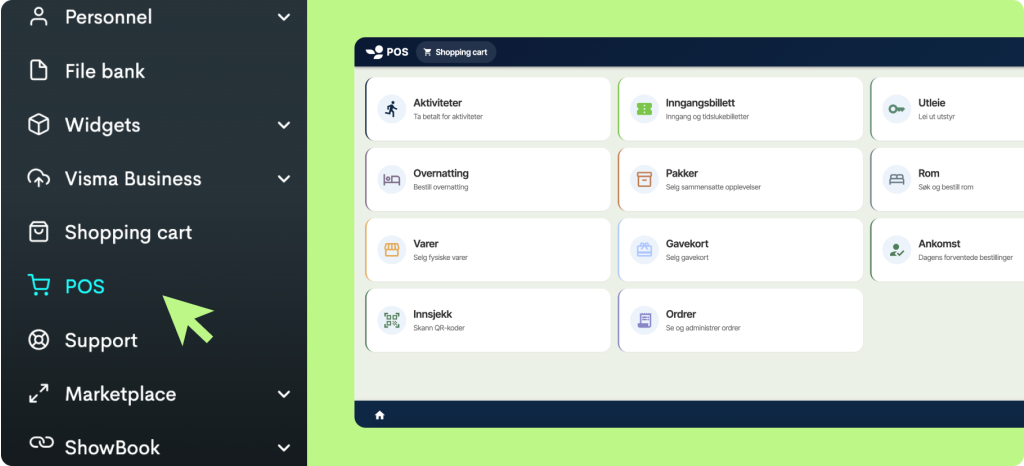 Integrated in Bilberry
Here, you'll get an overview of all the payment options we offer:
Activities: Choose from your products' availability.
Admission tickets: View all departures and available capacity for timeslot products.
Rentals: Select from available units.
Accommodation: Choose accommodation options and dates.
Packages: Sell bundled experiences.
Rooms: Sell accommodation in rooms with a specified number of guests.
Physical products: Select from physical items for sale.
Gift cards: Sell gift cards with a custom amount.
Arrivals: Overview of today's expected bookings.
Check-in: Easy guest check-in using QR code or reference.
Orders: View and manage orders.
Simply select the desired product and specifications and send it to payment via POS. It's that easy!
Why integrated POS matters for activity businesses
Most activity businesses today run separate systems for online booking and physical payment at the front desk. That means double bookkeeping, manual reconciliation and a risk that sales figures do not match. With an integrated POS solution, this problem disappears because all transactions end up in the same system regardless of whether the guest pays online or on arrival.
For a typical operator with a front desk, this means walk-in guests who show up in the morning can purchase an available seat on the afternoon tour directly through the POS. The sale is registered immediately in the booking system, capacity is updated across all channels, and the receptionist does not need to log into a separate system to check availability. Everything happens in one interface.
This integration is especially valuable for businesses that sell both activities and physical products. Many activity operators have a small shop next to the reception selling souvenirs, clothing or snacks. With POS in Bilberry, you can handle all of this in the same system and get consolidated reporting across all revenue, whether it is a RIB safari or a pair of gloves.
Unified financial overview and VAT handling
One of the biggest advantages of an integrated POS solution is that you get a complete financial overview in one place. Instead of pulling sales figures from the terminal, booking reports from the booking system and manually reconciling against the bank account, POS consolidates everything in Bilberry.
You can easily view revenue by product type, by payment method and by time period. This makes VAT reporting significantly simpler, especially for operators selling products with different VAT rates. Activities, rentals and physical goods may carry different tax rates, and with an integrated solution you do not need to calculate this manually.
The reporting also gives you insight into peak sales hours, which days generate the highest revenue and how the split between online and physical sales develops over time. This data can be used to plan front desk staffing, adjust opening hours and optimise your product mix.
Practical use in a busy day
POS in Bilberry is designed so that front desk staff can use it without training beyond what they already know about the booking system. The interface works equally well on a tablet as on a desktop computer, making it flexible for operators with reception areas in different locations.
A typical workflow during peak season might look like this: a guest arrives at the reception and wants to book a tour for tomorrow. The receptionist opens POS, sees available departures with remaining capacity, enters the number of guests and sends the payment to the terminal. The entire process takes under a minute. The guest receives a confirmation and receipt, and the booking appears in the system alongside all other bookings for that departure.
The check-in feature also makes it easy to handle guests who have already booked online. Scan the QR code from their confirmation, and the guest is checked in. No manual lists, no searching through the system. For operators handling group bookings with outstanding balances, POS can also accept partial payments and track what remains. See all the features Bilberry offers to run your activity business efficiently.
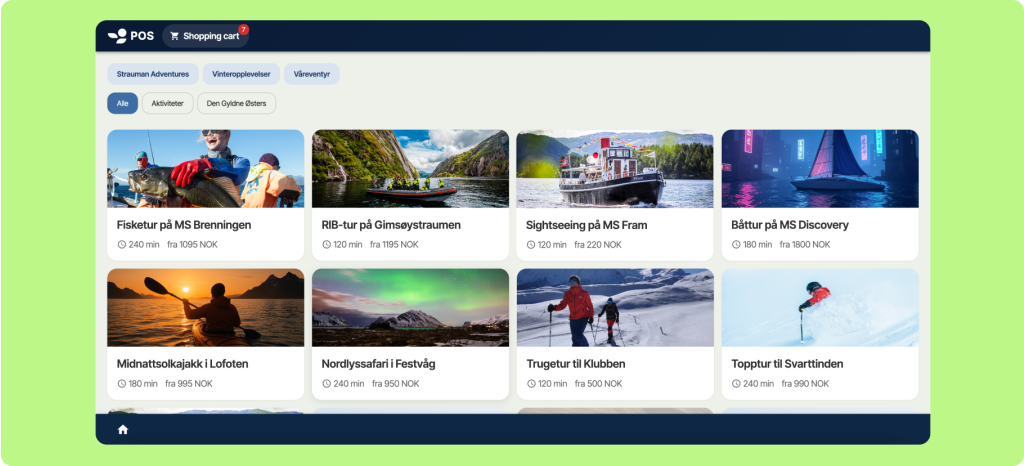 Fullscreen POS